Sunday, November 4, 2012
Drawovers
These are the paint-overs of the animatic. These should give a rough idea of what the final textures should look like in the final piece.
Wednesday, September 12, 2012
Chubs 4..
Here's a 4th iteration, i tried to make the hands more readable, and straightened out the shins in the side view. I reshaped the fingers a bit, and brought out chub's tits. Also tried to give him better trapezius muscles. More crits soon, and hopefully a final version.
Tuesday, September 11, 2012
Chubs try 3.. with some great ref
Justin gave me some great reference that sort of explained a bit more problems with the general shape and size of chubs.


So I brought his ass up and modified his rib cage some more. I also brought his face in a bit and let his jowls hang out more. I feel like his back is starting to shape up a bit more. This still isn't done, probably have another round of reviews then a final.
Chubs Try 2.. predesign
Here is chubs again after Justin's critiques. Take it away Alex.
Sorry if the colors are off, I recycled the old and sorta rushed it out to catch alex before he went to sleep.
Monday, September 3, 2012
654-Project Story Boards
Story Board Presentation today, here are my files.
Here are my story boards.Here are a few character sketches.
Thursday, January 26, 2012
CSCE 656- Computers and New Media
This is my website for CSCE 656- Computers and New Media. I'm in this class to discover new avenues for computation. This class also fulfills my final track level requirement so that I can graduate. I will be graduating this May with a dual BS in Computer Science and Visualization Sciences.
On a daily basis I use:
My computer:
Television: Comedies, Animation
Movies: Thrillers, Comedies, Science Fiction, Animated.
Mail: e-mail
Gaming: MOBA games, 1st person Shooters, MMO's.
Television:
Gaming: Shooters
Movies: Thrillers, Comedies, Science Fiction, Animated
iPhone:
Music: Anything really.
Mail: e-mail
Videos: Youtube
Games: Free to Play
Thursday, September 30, 2010
VIZ-615 Project 2
Tuesday, September 21, 2010
Monday, September 20, 2010
Sunday, September 5, 2010
Animal Footage 615
This video gets a bit violent at about 1:13 seconds. Watch past that at your own peril. I'm interested in using seconds 29-43 for the video footage assignment.
Really great quality reference footage.
Deer from Louis Otto on Vimeo.
Really nice reference of the musculature in the front leg. The deer does not get shot don't worry.
Good footage of a deer chewing.
Friday, April 10, 2009
Answers
Title: Stabby's Creation (currently)
Protagonist: The piece being created
Antagonist: (The anim8or)/time/the process
Climax: There isn't a climax, its more of a documentary style piece. As far as emotional altitude I would think some of the effects in modeling/Rigging might be a "high-point".
Composition: The peice is composed in the order that characters might ideally be created in, with many real world actions simplified to keep the piece interesting as well as somewhat informative.
Camera Angles: You will find that people in our peice are not ever centered while our character usually always is. We are trying to show that the focus is on the process of creating him not so much on the people who are tasked with doing so. This can in many ways be a view on how people really don't care as much about who makes these types of media, so much as the media itself. Next time you go to a pixar movie (not with vizzers) watch how many people stay for the credits.
Points of View: The composition tracks the creation of Stabby from the perspective of the character. As "he" is passed
along we travel with him through each one of the processes that create him. This is done because we are
trying to describe what creating the "character" is like, not necessarily how this affects his creators.
Editing: The animation, and cg scenes, are quick very quick because people perceive it to be so. While scenes where
the creators (Artist/Modeller-Rigger/Anim8or) are slow, and less visually stimulating to show that on our side its actually
quite time consuming, and difficult.
Highlights: The jump shot paper_to_trashcan where we focus the camera out. The modelling scene where polygons create
the stabby model. The rigging scene where composited hands create a CG rig. The Rig appending itself to the model. Credit
Scene.
Think/Feel: I hope they think the piece was visually appealing, while secretly taking a little bit away about how 3d characters
are created from a very dumbed down perspective. I hope it generates more interest in our work.
Animatic
In posting it the title got cut. A transition to the second cellphone call is missing, it simply shows the model zooms out showing the modeller/rigger on the phone, then transitions into the 2nd phone call as shown.
In the scene with the first cell phone conversation they say.
TpLft- Hey I just finished creating a character I think it might be fun if you model and rig him, interested?
btmRght- Sure, i'll give it a go.
TpLft- Good I allready e-mailed him too you. (Transition to next scene)
Thursday, March 26, 2009
Morph "Final"
Heres the final effect, finished coding it last night, it works with any model that is made of polygons. For this video I used it on a sphere made of 2500 faces. Enjoy.
I can't figure out how to bump the quality on blogger... come to me if you want to see it in higher rez.
I still want to add a bit of refinement, like having it build from the bottom up, or from the top down, should be easy.
-Jorge
Wednesday, March 25, 2009
Morph (Code)
Ok so... i'm still coding my morph but I'll put up my progress so far.
The name of the object I'm deforming is: sphere
//This Squishes the Sphere
int $i;
string $obj = "sphere";
float $pPos[];
for($i=0; $i <= 381; $i++){
select -r ($obj+".vtx["+$i+"]");
$pPos = `pointPosition -w ($obj+".vtx["+$i+"]")`;
move -r -os -wd (-$pPos[0]) 0 0;
}
//This splits the faces into individual peices
string $obj = "sphere";
for($i=0; $i <= 399; $i++){
select -r ($obj+".f["+$i+"]");
polyChipOff -kft off -dup off;
};
//Todo: Randomize face start times
//Todo: Set some faces to squish onto x axis rather than all on the z (I'll tell them to go to x or z by Face Normal value)
Heres what it looks like visually.

So with this I'll be able to apply the function to my model for our final movie, then animate the faces resuming their correct positions.
-Jorge
The name of the object I'm deforming is: sphere
//This Squishes the Sphere
int $i;
string $obj = "sphere";
float $pPos[];
for($i=0; $i <= 381; $i++){
select -r ($obj+".vtx["+$i+"]");
$pPos = `pointPosition -w ($obj+".vtx["+$i+"]")`;
move -r -os -wd (-$pPos[0]) 0 0;
}
//This splits the faces into individual peices
string $obj = "sphere";
for($i=0; $i <= 399; $i++){
select -r ($obj+".f["+$i+"]");
polyChipOff -kft off -dup off;
};
//Todo: Randomize face start times
//Todo: Set some faces to squish onto x axis rather than all on the z (I'll tell them to go to x or z by Face Normal value)
Heres what it looks like visually.
Before Squish

So with this I'll be able to apply the function to my model for our final movie, then animate the faces resuming their correct positions.-Jorge
Wednesday, March 11, 2009
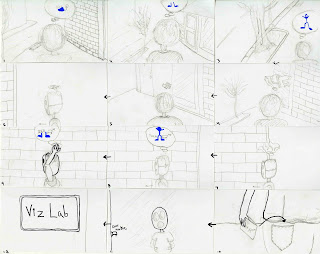
Story Board for Final

Masked "person" walking, he is thinking random thoughts, scraping the first couple because they don't work. Eventually he comes to a idea he enjoys, and he grabs it, folds it and stuffs it into his pocket. He then walks over towards the "Viz Lab" and opens it up and walks in.

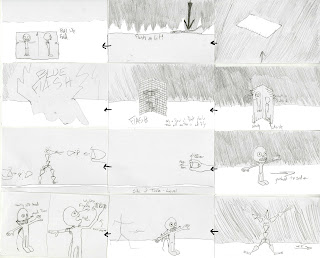
Enter completely dark room except a blindingly lit white table. As we walk up to the device our Idea from earlier is slammed onto the table, a flash of light the paper is gone, and a "digitized" version emerges on the table. The image is folded down the middle so that the sides are at 90 degrees, and stood up. Suddenly the paper is cut into a grid shape, and the "polys" begin to float out from the gridded paper slowly flying into their 3d orientation on the model. At first 1 or 2 fly out then they all begin to emerge, and the emanating light from the squares being pushed out flashes and the model is all that remains. Push the model to the side and we see the table once again with a clear state. 2 hands appear and begin to stretch thumb and index finger widths apart creating "bones" to the width of the fingers. Then they are shot to the center of the screen into their correct positions, follow by flickers of particular light indicating both their trajectory and when they click into place. This all occurs VERY QUICKLY, to the point were it almost seems like a fireworks show, with particulates flying from both sides of the screen and at the centers were bones click into place. Once the Bones are created it begins to stretch and jumps up in achievement. The bones then walk over to where the mesh stands and opens up the back sticking his head in and taking control of the mesh head. He moves the head of the mesh to the left and right and then puts his arm into the arm of the mesh. The head looks up to his left arm and the arm bends up and his fingers begin to wiggle around in response. The bones then completely "put on" the mesh and assume control.

The mesh then begins to do articulated stretches, and movements (jumping jacks, squats, karate punch). He will interact with credits in some way(not pictured)Credits roll.
Monday, March 9, 2009
Friday, March 6, 2009
360
360 Fly around
This is stabby currently. I added a UV map and a cell -shader effect. Still need to fix some of the UV map, everything you see is still preliminary. Ill put up the city walkthrough in a sec, it rendered at 4x the speed it played at, for some reason.
Wednesday, February 25, 2009
Story Board
Subscribe to:
Posts (Atom)


